
Company logos inconsistent embroidered apparel is one of the most common — and most fixable — branding headaches business owners face. It usually happens because of poor digitizing files, mismatched thread colors, or vendors using different embroidery settings for the same order. The fix is simpler than most owners expect: standardize your digitized logo file, lock in exact thread colors, and work with one embroidery partner who keeps your specs on record.
We’ve seen this play out with landscaping crews in Ocala and hospitality staff in Gainesville — one batch of polos looks crisp, the next looks flat or lopsided. It’s rarely a design problem. It’s almost always a production process problem, and it’s solvable in one round of corrections.
📌 Key Takeaways
- Inconsistent embroidered logos usually trace back to a bad or outdated digitizing file, not a bad design.
- Thread color drift happens when vendors substitute "close enough" thread brands instead of matching your Pantone-to-thread conversion.
- A locked embroidery file (.DST or similar) should be saved and reused for every reorder, not recreated each time.
- Auditing one sample garment per order catches 90% of consistency problems before a full run ships.
- Working with a single local embroidery partner across Ocala, Gainesville, and Brandon teams keeps every logo identical, order after order.
Jump to a Section
- Why Are Company Logos Inconsistent on Embroidered Apparel?
- How to Spot Embroidery Logo Problems Before They Ship
- Fixing Company Logos Inconsistent Embroidered Apparel for Good
- DIY Digitizing vs. Professional Embroidery: What’s the Real Cost?
- Building a Brand Consistency Policy Across Your Team
- FAQ: Company Logos and Embroidered Apparel Questions
Why Are Company Logos Inconsistent on Embroidered Apparel?
Quick Answer: Most inconsistency comes from digitizing errors, thread substitutions, or multiple vendors interpreting the same logo differently. Once you isolate the cause, correcting it usually takes one revised file, not a full redesign.
Embroidery isn’t printing — it’s a mechanical process where a digitized file tells a machine exactly where to stitch. That file, called a digitizing file, converts your logo’s vector art into stitch paths, densities, and directions. If two different digitizers created two different files for the same logo, you’ll get two different results, even on identical shirts.
Digitizing File Drift
When a business reorders apparel from a new vendor without sending the original file, that vendor often re-digitizes from scratch. Stitch count, pull compensation, and underlay settings can all shift slightly. The result: a logo that’s technically "the same" but visibly different in thickness, size, or clarity.
Thread Color Drift
Thread manufacturers use their own numbering systems, and not every shop stocks identical brands. A vendor without your exact thread codes may eyeball a "close match," which is how a navy logo slowly becomes charcoal blue across different batches.
⚠️ Common Mistake: Approving a new embroidery vendor’s proof without comparing it side-by-side against a sample from your last order. Small shifts are easy to miss on screen but obvious on a rack of polos.
How to Spot Embroidery Logo Problems Before They Ship
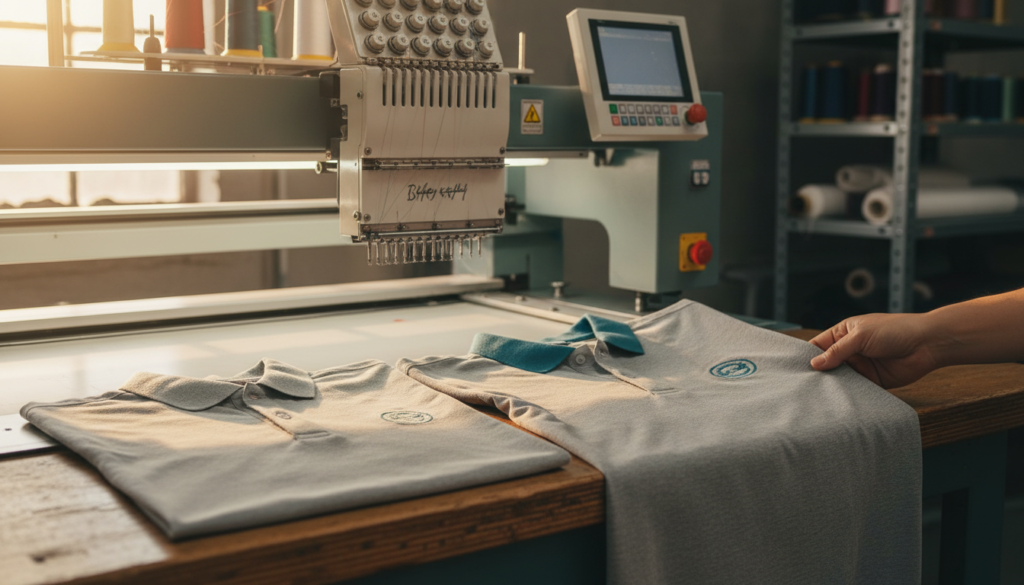
Quick Answer: Request a physical pre-production sample, not just a digital mockup, and check it under natural light against a prior garment. Catching problems here saves you from a full reorder later.
A digital proof shows placement and color intent, but it can’t show real stitch density or thread sheen. According to the U.S. Small Business Administration, maintaining consistent branding across all customer touchpoints is one of the strongest low-cost ways small businesses build trust — and uniforms are often a customer’s first physical brand impression.
The Five-Point Sample Check
- Compare thread color against a swatch card, not memory.
- Measure logo width and height against the last approved order.
- Check stitch density — the logo shouldn’t feel stiffer or thinner than before.
- Flip the garment inside out to inspect backing and thread tension.
- Confirm placement is identical on the chest, sleeve, or cap position used previously.
✅ Quick Tip: Keep one "master" garment from your best embroidery order in a labeled bag. Use it as the permanent comparison standard for every future reorder, regardless of vendor.
Reading Digital Proofs Correctly
Ask your vendor for a proof rendered at 100% scale with a stitch simulation, not just flat vector art. A true stitch simulation shows how dense embroidery will actually look, which flat mockups can’t replicate accurately.
Fixing Company Logos Inconsistent Embroidered Apparel for Good
Quick Answer: The lasting fix is a single, owned digitizing file paired with a documented brand standard, used by every vendor you work with going forward. This removes guesswork permanently.
Once you’ve identified where the drift started, the repair is straightforward. First, have a professional digitizer create — or clean up — one master embroidery file from your current logo. Second, document exact thread numbers, placement measurements, and garment sizing in a short one-page reference sheet. Third, require that file and sheet to travel with every future order, regardless of which shop stitches it.
Our team at Brick City Branding builds this master file once during onboarding for embroidery services clients across Marion, Alachua, and Clay counties, so every reorder — whether it’s five shirts or five hundred — comes out identical. We’ve also documented the most common flaws we catch during quality checks in our breakdown of custom shirt embroidery design flaws, which is worth a read if you manage apparel for a growing crew.
💡 Expert Insight: A properly built digitizing file is a business asset, not a throwaway. Treat it like your logo’s vector file — store it, back it up, and never let a vendor "start fresh" without it.
When You Need a Logo Redesign Instead
Sometimes the underlying logo itself is the problem — too much fine detail, tiny text, or thin gradients that embroidery machines physically cannot render cleanly. In that case, a simplified version built for stitching, not just a re-digitized file, is the right call. Our logo design team can build a stitch-friendly variant that still matches your primary brand identity.
📊 Data Point: The U.S. Patent and Trademark Office notes that consistent, uniform use of a brand mark strengthens its legal distinctiveness over time — another reason drifting logo versions across apparel can quietly weaken brand protection, not just appearance.
DIY Digitizing vs. Professional Embroidery: What’s the Real Cost?
Quick Answer: DIY or budget digitizing looks cheaper upfront but often costs more in reorders, mismatched batches, and wasted garments. A one-time professional digitizing fee typically pays for itself within two orders.
| Factor | DIY / Budget Digitizing | Professional Embroidery Partner |
|---|---|---|
| Upfront cost | Low or free with online tools | One-time digitizing fee ($40-$100 avg) |
| Consistency across orders | Often varies by operator | File is saved and reused exactly |
| Thread color accuracy | Frequently approximated | Matched and documented by code |
| Fine detail handling | Struggles with small text/logos | Adjusted by a trained digitizer |
| Long-term cost | Higher (reorders, redo runs) | Lower (one file, many uses) |
Businesses in Brandon and Dade City that switch to a single documented file typically stop paying for redo runs entirely. The upfront fee is small compared to reprinting or re-embroidering a bulk order that came back wrong.
Building a Brand Consistency Policy Across Your Team
Quick Answer: A short internal policy — one page, three rules — keeps every future apparel order on-brand, even if staff or vendors change. This is the step most small businesses skip.
A brand consistency policy doesn’t need to be complicated. It needs three things: an approved master file location, an approved thread and color reference, and a single point of contact responsible for approving new orders before they’re placed.
Why This Matters Beyond Apparel
The same drift that happens with embroidery can happen with signage, vehicle graphics, or printed materials if there’s no central brand file. We cover this in more depth in our guide on brand refresh versus rebrand, which is useful if your logo itself hasn’t been touched in years and may need updating before you lock in a new master file.
⚠️ Common Mistake: Letting whoever places the order that week pick the vendor, with no reference file attached. This is how one company can end up with three visibly different logo versions in a single year.
According to SCORE, a nonprofit partner of the SBA, small businesses that formalize even simple brand standards report fewer costly reprints and stronger customer recognition over time. That guidance applies directly to embroidered uniforms, which employees wear daily in front of customers.
FAQ: Company Logos and Embroidered Apparel Questions
Why do company logos look inconsistent on embroidered apparel from different vendors?
Different vendors often re-digitize the same logo from scratch instead of using your original stitch file, causing shifts in size, density, and thread color. The fix is supplying every vendor with one locked digitizing file and thread reference sheet.
How much does it cost to fix an inconsistent embroidered logo?
Most professional digitizing corrections run $40-$100 as a one-time fee, which then gets reused for every future order at no extra cost. This is far cheaper than reordering a full batch of mismatched apparel.
Can a logo be too detailed for embroidery?
Yes, fine text, thin gradients, and tightly spaced elements often blur or fill in when stitched. A simplified, stitch-friendly version of the logo usually solves this without changing your overall brand identity.
What file format should I give my embroidery vendor?
A digitized stitch file, commonly a .DST, .PES, or .EXP format, is what machines actually read — not just a JPG or PNG of your logo. Always request this file back after your first order so you own it going forward.
How do I make sure new hires get the same uniform look as existing staff?
Keep a labeled master garment and the approved digitizing file on record, and require every reorder to reference both. This keeps a new employee’s polo or jacket identical to one issued three years earlier.
Is it worth using one embroidery company for all locations?
For businesses with multiple locations across counties like Marion, Alachua, or Pasco, one embroidery partner virtually eliminates version drift. Splitting orders across vendors is the single most common cause of mismatched logos we see.
Do embroidered logos fade or change color over time on their own?
Washing and sun exposure can dull thread slightly, but a sudden or dramatic color shift almost always means a different thread batch or vendor was used, not natural fading. Comparing against a stored master sample quickly confirms which cause applies.
Final Thoughts
Company logos inconsistent embroidered apparel problems feel frustrating, but they’re almost always process issues, not design failures. A locked digitizing file, a documented thread reference, and one trusted embroidery partner solve the problem permanently in most cases. As of 2026, businesses across Ocala, Gainesville, Brandon, and surrounding counties are increasingly centralizing apparel orders for exactly this reason.
Next steps:
- Pull your most recent embroidered garment and compare it against an older one.
- Request your current vendor’s digitizing file — if they can’t provide it, that’s your answer.
- Get one master file built professionally and store it permanently.
- Set a simple one-page brand reference for thread color, sizing, and placement.
Ready to lock in a consistent look for your whole team? Start your project with Brick City Branding’s embroidery team today.